Coding agents with Pensieve
Give Claude Code, Codex or your preferred coding agent the architecture, decisions and company context behind your next change.
Step 1. Connect your company sources
Connect your company sources to a Pensieve context to build your company brain. If you have not done this yet, follow the Overview. Already connected? Move to step 2.
Step 2. Connect your coding agent
Open your repository in Claude Code, Codex or your preferred coding agent. Follow its instructions in Setup & clients to connect Pensieve and sign in. If you already installed the plugin in Claude, check whether it has synced to Claude Code before installing it again.
Ask your agent to list your Pensieve contexts and use the one for your company. Confirm it can read your company context.
Step 3. Give your agent a task
Paste the instruction below at the start of a task. For future work, save it in your project's CLAUDE.md for Claude Code or AGENTS.md for Codex.
Pensieve is our company brain. Use it to understand the business and ground your work in our company context when making changes.Then describe a real, bounded change. For example:
We want to simplify the sign-up flow. Find the existing decisions and constraints, inspect the implementation, and propose the smallest change.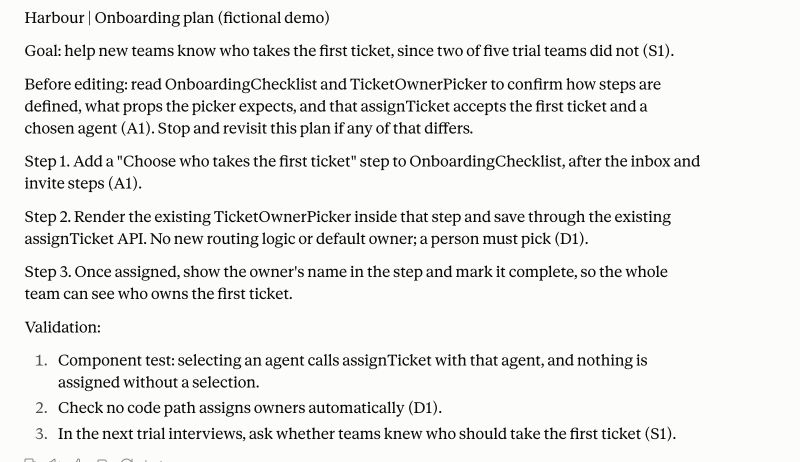
Example plan generated in Claude chat from fictional architecture and decision notes. This illustrates the reasoning to look for; it is not a Claude Code connection or repository inspection.
Step 4. Review the plan, then build
Check that the plan makes sense for your business and the current code. Clarify anything that is missing or out of date. Pensieve supplies company understanding; your coding agent uses its own tools to edit files and run checks.
Once the plan is right, ask your agent to implement it and run the repository's required checks. Review the diff and results as you would any other change.
Use the writing guide if a new decision belongs in the shared context. For a different coding tool, see Setup & clients.
Step 5. Connect it to a recurring workflow
Your coding agent can also pick up work from other agents. For example, a scheduled Head of Product task can write suggestions to a Notion database. You review the suggestions and mark tickets as ready; an automation passes them to your coding agent to implement, check and open a pull request for review.
- Run Head of Product
- Suggestions in Notion
- Coding agent takes a ready ticket
- Pull request for review
Use the Head of Product scheduling example to set up the first part. Configure the ticket trigger and coding agent separately, with access to the repository and the same Pensieve context. Have it link the PR back to the ticket so later reviews can see the result.
Put your team's implementation and review rules in a reusable skill or project instructions. This keeps the workflow specific to how you work.
Up next
Share knowledge between agents